Mod HUD per MinecraftIl tuo HUD. Il tuo layout.
58 widget per coordinate, FPS, armatura, pozioni, CPS e altro. Premi Shift destro, clicca su Edit HUD Widgets e trascinali dove vuoi. Si agganciano da soli al loro posto.
- Gratis
- Da Minecraft 1.8.9 all'ultima versione
- Windows, macOS e Linux
Trascina, aggancia, seleziona più widget, scala
Premi Shift destro e clicca su Edit HUD Widgets: il menu delle mod si fa da parte e l'HUD è tutto tuo. Trascina un widget e si aggancia ai bordi dello schermo, alla linea centrale o subito sotto un altro widget, a cui resta attaccato. Shift o Ctrl più clic seleziona più widget insieme, e le maniglie agli angoli scalano un widget da metà a una volta e mezza la sua dimensione.
- Shift destro (o un tasto a tua scelta) apre il menu delle mod, con l'editor a un clic di distanza
- Si aggancia ai bordi dello schermo, alla linea centrale e agli altri widget
- Tieni premuto Ctrl (Cmd su Mac) per posizionare un widget liberamente
- Shift o Ctrl più clic ne seleziona diversi, Ctrl + A tutti
- Scala da 0,5 a 1,5, con aggancio a 1,0 e al widget vicino
- Clic destro per Impostazioni, Rimuovi, Ripristina e Reimposta Scala
- Un suono quando un widget si aggancia o si attacca
Widget che si agganciano dove vive l'HUD del gioco
Alcuni punti dello schermo sono fatti apposta per un widget: tre posti su ogni lato della hotbar per l'armatura e gli oggetti in mano, i bordi dello schermo per la scoreboard, la riga sopra la hotbar per la barra delle azioni. Lascia lì un widget e resta agganciato. Gravità Oggetti fa scendere gli oggetti negli slot vuoti, così la tua armatura non ha mai buchi.
- Armatura ed entrambe le mani stanno accanto alla hotbar di default
- Sei posti per gli oggetti, tre su ogni lato della hotbar
- Scoreboard sul bordo sinistro o destro dello schermo
- Posti per Salute, Sazietà, Barra Azione, Barra del Boss e Titolo
- Posti sul mirino per Progresso rottura e Damage Direction
- Gravità Oggetti è attiva di default
Quando un pezzo sta per rompersi, te lo segnala il Durability Warning della mod Inventario.
Personalizza ogni etichetta come la leggi meglio
Ogni widget di testo ha un'etichetta, un valore e le parentesi intorno, ognuno con un colore a tua scelta. Scegli uno dei dieci formati, da [FPS] 143 a FPS: 143 o solo il valore. Sul lato destro dello schermo il formato si inverte, così i valori restano allineati al bordo. Uno sfondo con margini interni e angoli arrotondati a tua scelta tiene il testo leggibile anche sulla neve.
- Dieci formati, [Etichetta] Valore di default
- Colori propri per etichetta, parentesi e valore
- Sfondo con colore, margine interno, margine esterno e arrotondamento
- Altezza della riga dal 50 al 150 %
- Formattazione specchiata sul lato destro dello schermo
- Il tuo testo per l'etichetta, fino a 32 caratteri
- Un clic applica uno stile a tutti i widget
Dalle coordinate alla temperatura della CPU
Dati, mondo e server, giocatore, oggetti, tempo, il tuo sistema e i tuoi canali. Cerca per nome o per quello che ti serve, come “armatura” o “batteria”. I widget per gli scontri come PvP Stats e Totem Pops fanno parte delle mod PvP, il widget FPS va a braccetto con Dynamic FPS.
58 widget

FPS
I tuoi fotogrammi al secondo.
Dati
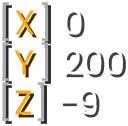
Coordinate
X, Y e Z su una riga o su tre, con punto cardinale e bioma se vuoi.
Dati
Rotazione
L'angolo esatto in cui guardi: yaw e pitch.
Dati
Bioma
Il bioma in cui ti trovi.
Dati
Direzione
La direzione in cui guardi, come nella schermata F3.
Dati
Latenza
La tua latenza verso il server, colorata in base a quanto è buona.
Dati
Blocco mirato
Le coordinate del blocco sotto il tuo mirino.
Dati
Mostra Direzione
Una barra bussola in alto che mostra dove stai guardando.
Dati
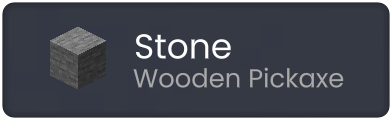
Waila
Il blocco o il mob che stai guardando, con i dettagli.
Dati
Entità
Quante entità vengono renderizzate intorno a te.
Mondo e server
Numero Giocatori
Quanti giocatori sono online sul server.
Mondo e server
Indirizzo Server
L'indirizzo del server su cui giochi.
Mondo e server
Luminosità
Il livello di luce dove ti trovi, per vedere dove possono comparire i mob.
Mondo e server
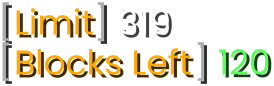
Limite di altezza
Il limite di costruzione, la tua Y e quanti blocchi puoi ancora impilare.
Mondo e server
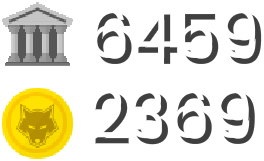
Saldo
I tuoi contanti e il saldo in banca sui server che li inviano.
Mondo e server
Danger Warner
Indica i mob pericolosi che vogliono attaccarti.
Mondo e server
Direzioni compagni
Frecce intorno al mirino che puntano verso i tuoi compagni di squadra, dove i server lo consentono.
Mondo e server
CPS
I tuoi clic sinistri e destri al secondo.
Giocatore
Combo
Colpi di fila su un giocatore senza essere colpito.
Giocatore
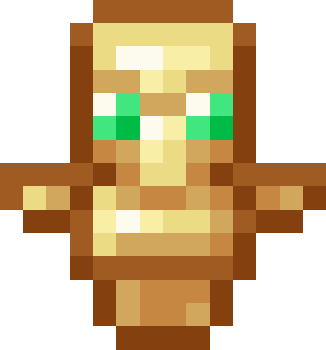
Totem Pops1.11+
I totem che hai consumato e quelli che ti restano.
Giocatore
Reach Display
A che distanza eri quando hai colpito qualcuno.
Giocatore
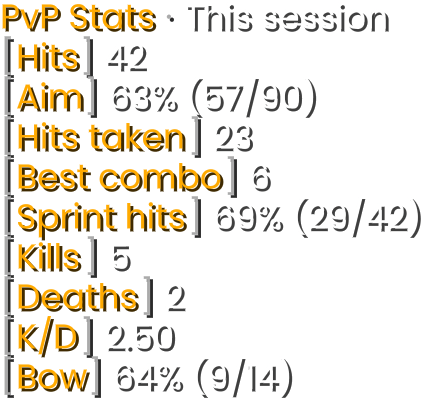
PvP Stats
Colpi, mira, combo e kill per sessione e per giorno.
Giocatore
Velocità
Quanto veloce ti muovi, in blocchi al secondo.
Giocatore
Effetti PozioniAttivo di default
I tuoi effetti attivi e quanto durano ancora.
Giocatore
Salute
La tua salute come cuori o come numero.
Giocatore
Sazietà
La tua fame e la sazietà nascosta.
Giocatore
Paper Doll
Un piccolo modello 3D del tuo giocatore sullo schermo.
Giocatore
Progresso rottura
A che punto sei nel rompere un blocco.
Giocatore
Damage Direction
Da dove è arrivato il danno, intorno al tuo mirino.
Giocatore
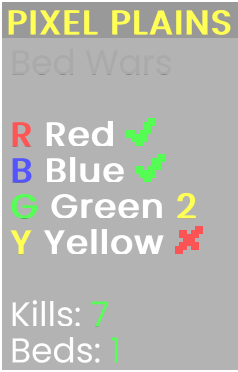
ScoreboardAttivo di default
Sposta, scala e cambia lo stile della scoreboard del server.
Sostituti vanilla
Barra Azione
Sposta e scala il testo sopra la tua hotbar.
Sostituti vanilla
Barra del Boss
Sposta, scala o nascondi la barra della salute dei boss.
Sostituti vanilla
Titolo
Sposta e scala i titoli che ti mostrano i server.
Sostituti vanilla
Animazione totem1.11+
Mette l'animazione del totem in un riquadro a tua scelta.
Sostituti vanilla
Frecce
Quante frecce hai.
Oggetti
Mano PrincipaleAttivo di default
L'oggetto che hai in mano e la sua durabilità.
Oggetti
Mano secondariaAttivo di default1.9+
L'oggetto nella mano secondaria e la sua durabilità.
Oggetti
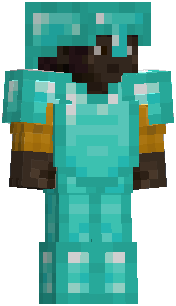
ElmoAttivo di default
Il tuo elmo e la sua durabilità.
Oggetti
CorazzaAttivo di default
La tua corazza e la sua durabilità.
Oggetti
GambiereAttivo di default
Le tue gambiere e la loro durabilità.
Oggetti
StivaliAttivo di default
I tuoi stivali e la loro durabilità.
Oggetti
Traccia Inventario
Quali oggetti hai raccolto, gettato o usato.
Oggetti
Conta Oggetti
Quanti degli oggetti che scegli hai nell'inventario.
Oggetti
Cronometro AFK
Da quanto tempo sei inattivo.
Tempo
Orologio
L'ora reale, a 12 o 24 ore o con un formato tuo.
Tempo
Data
La data di oggi.
Tempo
Orario nel Mondo
L'ora in gioco, con il conteggio dei giorni se vuoi.
Tempo
Tempo di Gioco
Da quanto tempo stai giocando.
Tempo
Cronometro
Conta in avanti come un cronometro o all'indietro come un timer, con i tuoi tasti.
Tempo
Memoria
Quanta memoria usa Minecraft.
Sistema
Livello Batteria
Il livello della batteria del tuo portatile.
Sistema
Uso della CPU
Quanto è sfruttata la tua CPU.
Sistema
Uso della Memoria
Quanta memoria del tuo computer è in uso.
Sistema
Temperatura CPU1.17+
La temperatura della tua CPU.
Sistema
Statistiche TikTok
Il numero dei tuoi follower su TikTok.
Servizi
Statistiche Twitch
Il numero dei tuoi follower su Twitch.
Servizi
Statistiche YouTube
Il numero dei tuoi iscritti su YouTube.
Servizi
Dynamic FPS
In quale stato della finestra si trova Dynamic FPS e quale frame rate consente.
Impostazioni


































Cerchi i keystrokes? Non sono tra i 58, ma puoi aggiungerli come addon dallo store degli addon.
Sappi sempre cosa stai guardando
Waila (What Am I Looking At) mostra il blocco o il mob sotto il tuo mirino: nome e icona, lo strumento che ti serve, quanto è cresciuta una coltura o il ritardo di un ripetitore. Per i mob vedi la loro salute e, per i villici, il mestiere con il suo livello.
- Nome, icona e lo strumento che ti serve per i drop
- Crescita delle colture, potenza della redstone, ritardo del ripetitore, modalità del comparatore
- Progresso della rottura mentre scavi
- Salute di mob e giocatori
- Mestiere e livello dei villici
- Opzionale: amici Laby e il gruppo Laby di un giocatore
- Sfondo del tooltip, uno tuo o nessuno
Trova gli angoli bui e il blocco esatto
Luminosità mostra quanta luce c'è dove ti trovi, da 0 a 15, così trovi gli angoli bui dove possono comparire i mob prima che lo facciano. Blocco mirato mostra le coordinate del blocco sotto il tuo mirino, comodo per costruzioni, farm e per dire a un amico dove scavare.
- Luminosità: da 0 a 15, proprio dove ti trovi
- Blocco mirato: X, Y e Z del blocco che guardi
- Blocco mirato compare solo mentre guardi un blocco
- Sono entrambi widget di testo, quindi funziona ogni opzione di stile
Preferisci vedere al buio invece di misurarlo? Fullbright illumina ogni blocco.
I tuoi widget sul telefono, come secondo schermo
Con External Devices attivo, l'app Laby mostra i tuoi widget HUD sul telefono, proprio accanto alla tastiera. Trova da sola il tuo PC sulla stessa rete, confermi l'abbinamento una volta in gioco, e da quel momento ogni widget di testo si aggiorna quattro volte al secondo. Il monitor resta tutto per il gioco.
- Spento finché non attivi External Devices
- Trova il tuo PC sulla stessa rete, senza server in mezzo
- Accetti una volta in gioco, poi si riconnette da solo
- Lo stesso account nell'app e nel gioco
- Ogni widget di testo, anche quelli degli addon e quelli che non hai posizionato
- Si aggiorna quattro volte al secondo
Uno Stream Deck si abbina allo stesso modo, in External Devices.

Pronto in un minuto
- 1Attiva External Devices nel Laby Client.
- 2Collega il telefono alla stessa rete Wi-Fi del PC.
- 3Apri l'HUD nell'app Laby e clicca su Accetta in gioco.
Domande e risposte
Come mostro le coordinate in Minecraft?
Premi Shift destro per aprire il menu delle mod del Laby Client, cerca Coordinate e trascina il suo riquadro sullo schermo. Mostra X, Y e Z su tre righe o su una, con i decimali se li vuoi, e può aggiungere il punto cardinale e il bioma.
Come mostro gli FPS in Minecraft?
Premi Shift destro per aprire il menu delle mod del Laby Client e trascina il riquadro FPS in un angolo dello schermo. Se il numero è più basso di quanto vorresti, dai un'occhiata a Prestazioni e Dynamic FPS.
Come apro l'editor HUD?
Premi Shift destro mentre giochi e clicca su Edit HUD Widgets. Nelle impostazioni dei tasti rapidi il tasto si chiama Widget Editor Key, e lì puoi sceglierne un altro. Nell'editor trascini i widget, ne selezioni diversi con Shift o Ctrl più clic, e con il clic destro su un widget apri le sue impostazioni.
Esiste un HUD per l'armatura e uno per le pozioni?
Sì, ed entrambi sono attivi di default. Elmo, Corazza, Gambiere e Stivali sono quattro widget degli oggetti accanto alla hotbar, ognuno con la sua durabilità come barra, in percentuale o come rimanente e massima. Effetti Pozioni elenca i tuoi effetti con il tempo che gli resta.
Il Laby Client ha un contatore CPS e i keystrokes?
Il widget CPS è integrato e conta i tuoi clic sinistri e destri al secondo, su una o due righe. I keystrokes non sono tra i widget integrati; puoi aggiungerli come addon dallo store degli addon.
Su quali versioni di Minecraft e su quali server funzionano i widget HUD?
Li disegna il tuo client, da Minecraft 1.8.9 fino all'ultima release. Alcuni richiedono una versione più recente del gioco: Mano secondaria dalla 1.9, Totem Pops e Animazione totem dalla 1.11 e Temperatura CPU dalla 1.17. I server possono disattivarne alcuni, come l'HUD delle pozioni e dell'armatura.
Altre mod per Minecraft nel Laby Client
PvP e combattimento
Hit Markers, suoni delle uccisioni, un avviso quando la salute è bassa, timer della TNT, Team Markers, colori dello scudo e un HUD che tiene il punteggio.
Prestazioni e Dynamic FPS
Più FPS mentre giochi e meno consumi quando non giochi: Dynamic FPS rallenta il gioco in background, il rendering ottimizzato lo rende più veloce.
Visuale e FOV
FOV Changer senza lo zoom della corsa, niente visuale oscillante, una telecamera più calma quando subisci danni, mob più piccoli e Fullbright per le grotte.
Mod Inventario
Cerca in ogni baule, sbircia nelle scatole di shulker, blocca gli slot e ricevi un avviso prima che l'equipaggiamento si rompa. 23 miglioramenti in una sola mod.
Strumenti
Un segnalino per i tuoi amici, un metro, il limite di altezza di costruzione e torce che restano nella mano secondaria.
Grafica
Sposta e ridimensiona gli oggetti in mano, cambia colore al luccichio degli incantesimi, abbassa il fuoco, regola ogni particella e lascia scie di condensa con le elitre.
Costruisci il tuo HUD nel Laby Client.
58 widget, l'editor su Shift destro e il tuo telefono come secondo schermo. Tutto incluso, tutto gratis.
Gratis, ti basta il tuo account Minecraft. Tutte le mod sono già incluse.