Mod PvP per MinecraftVedi ogni colpo. Senti ogni kill.
Hit marker per ogni colpo confermato dal server, un suono per ogni kill, i totem consumati contati sulle targhette e un HUD che tiene il punteggio.
- Gratis
- Da Minecraft 1.8.9 all'ultima versione
- Windows, macOS e Linux
Sappi che il colpo è andato a segno, proprio sul mirino
Ogni volta che il server conferma un colpo, sul mirino lampeggia un piccolo segno: bianco per un colpo, oro per un colpo critico, rosso per la kill. I colpi che il server ignora non compaiono mai, così impari il tuo vero timing invece di tirare a indovinare.
- Croce diagonale, croce dritta o anello
- Dimensione da 2 a 16, distanza da 0 a 10, spessore da 1 a 3
- Visibile da 2 a 20 tick, con dissolvenza opzionale
- Può scalare in base alla distanza dal bersaglio
- Giocatori e mob, o solo giocatori
- Opzionale per i colpi dei proiettili e in terza persona
- Suono del colpo: 15 preset o qualsiasi ID suono
I tiri lunghi con l'arco sono più facili con lo Zoom sul tasto C.
Un suono per ogni kill, e uno per la vittoria
Ogni kill ha il suo suono, così sai che lo scontro è finito senza leggere la chat. Dai un suono diverso alle kill in mischia, con l'arco, con la canna da pesca e con gli oggetti lanciati, e aggiungi un suono di vittoria che parte quando compare il titolo della vittoria.
- Sfera di esperienza di default, o qualsiasi ID suono
- Suono a parte per mischia, arco, canna da pesca e oggetti lanciati
- Volume (80 di default) e tono dal 50 al 200 %
- Opzionale per le kill dei mob
- Può riconoscere le kill anche dai messaggi in chat
- Suono di vittoria su titoli come “VICTORY”, parole chiave a tua scelta

Accorgiti subito quando la salute è bassa
Quando la salute scende sotto una soglia, i bordi dello schermo diventano rossi. Attiva il battito cardiaco e lo senti anche: meno salute hai, più veloce batte, così te ne accorgi in mezzo allo scontro senza abbassare lo sguardo sui cuori.
- Soglia dal 5 al 100 % (40 % di default)
- Bordi dello schermo o schermo intero
- Tinta di qualsiasi colore, intensità 70 di default
- Pulsazione opzionale a ritmo del battito
- Può contare i cuori di assorbimento
- Il battito accelera man mano che la salute scende
Sappi esattamente quando esplode la TNT
Sopra la TNT innescata compare un conto alla rovescia che passa dal verde al rosso mentre la miccia si consuma. Come la targhetta di un giocatore accovacciato, il timer si nasconde dietro i blocchi, quindi non ti mostra niente che non potresti già vedere.
- Da 0 a 2 decimali (1 di default)
- Dal verde al rosso, o un colore a tua scelta (anche chroma)
- Sfondo e ombra opzionali
- Correzione della miccia da -60 a +60 tick
- Nascosto dietro i blocchi
- I server possono disattivarlo
Trova i tuoi compagni, anche attraverso i muri
Sopra ogni giocatore della tua squadra fluttua una freccia o la sua testa, con la distanza e, se vuoi, il suo nome, anche dietro i muri. È un vero vantaggio, quindi funziona solo sui server che lo consentono. In giocatore singolo funziona sempre.
- Disattivato di default, e sui server solo quando il server lo consente
- Squadre in base ai team della scoreboard o al colore del nome
- Squadre da 2 a 64 giocatori (16 di default)
- Freccia o testa, dimensione da 0,5 a 2
- Distanza come “24m”, e il nome se vuoi
- Nasconde i compagni più vicini di 0-32 blocchi (8 di default)
- Portata limitabile da 16 a 512 blocchi
- Colore della squadra o uno tuo, un tasto per attivarlo e il widget Direzioni compagni


Vedi quando uno scudo è alzato e quando è rotto
Gli scudi cambiano colore in base al loro stato: verde mentre parano, rosso quando un'ascia li ha disattivati. Vedi al volo quando il tuo avversario può essere colpito di nuovo. Il client aggiunge i suoni mancanti di parata e disattivazione, e puoi abbassare il tuo scudo così copre meno lo schermo.
- Colori per tutti, solo per gli altri giocatori o solo per il tuo scudo
- Aggiunge i suoni mancanti di parata e disattivazione
- Altezza dello scudo da 0 a 100 (100 è vanilla)
- Scudo abbassato: normale o di lato
- Minecraft 1.9 e successive
- I server possono disattivare i colori di stato
Meno fuoco e vetro trasparente in più li trovi con Clear View.
Un indicatore d'attacco che noti davvero
Dalla 1.9 un colpo fa danno pieno solo quando l'arma si è ricaricata. Scegli l'indicatore che si abbina al tuo mirino: Minecraft, Bar, Ring o Dot, sul mirino o sulla hotbar, da metà al doppio della dimensione. Mostra anche i cooldown degli oggetti, quanto è teso il tuo arco e quanto ci vuole per mangiare.
- Stili: Minecraft, Bar, Ring e Dot
- Posizione: come in Minecraft, sul mirino o sulla hotbar
- Dimensione dal 50 al 200 %
- Cooldown di perle di ender, coro e cariche di vento
- Carica di arco, balestra e tridente
- Mangiare, bere, rompere blocchi, addormentarsi
- Suono quando l'attacco è pronto (dalla 1.9)
- Suono quando finisce un cooldown
Conta ogni totem consumato
Ogni volta che un giocatore consuma un totem, un contatore sulla sua targhetta e nella lista dei giocatori sale: verde per il primo, poi giallo, oro e rosso dal quarto. Si azzera quando muore, quando cambi server o quando premi il tuo tasto di reset. Le targhette possono anche mostrare il ping del giocatore e avere un'ombra del testo che resta leggibile anche sulla neve.
- Icona del totem e numero, numero, segno meno e numero, oppure “3 pops”
- Sulle targhette e nella lista dei giocatori
- Si azzera alla morte, al cambio di server o con un tasto
- Nascondi il totem nella mano secondaria, regola l'animazione e le particelle del pop
- Ping sopra, sotto, a sinistra o a destra del nome, colorato in base al ping
- Nametag Text Shadow per gli sfondi chiari
- I totem richiedono Minecraft 1.11 o successive
- I server possono disattivare il contatore dei totem
Badge Laby, bandiere e la tua targhetta: targhette.
Un HUD che tiene il punteggio
Il Laby Client include 58 widget HUD, e questi sono fatti per gli scontri, più due mod per i tuoi cuori e la barra dell'armatura. Trascinali dove vuoi nell'editor HUD, accanto a tutti gli altri widget.
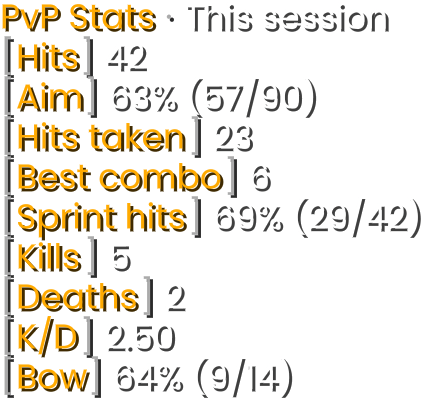
- PvP StatsColpi, mira, combo migliore, quota di W-tap, kill, K/D e precisione con l'arco. Per sessione, giorno, settimana, mese o in totale, e lo storico resta sul tuo computer.

- Damage DirectionArchi o frecce intorno al mirino mostrano da dove è arrivato un colpo.
- Totem PopsI tuoi totem consumati, quelli che ti restano o entrambi, più quelli degli altri giocatori.
- CronometroCronometro o conto alla rovescia fino ai millisecondi, con tasti per avviare, mettere in pausa e azzerare.
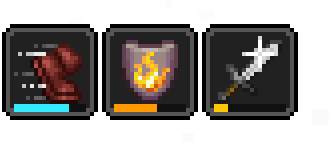
- Effetti PozioniEffetti in stile Minecraft con barre della durata che pulsano prima di finire.
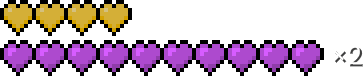
- Cuori in una rigaTutti i tuoi cuori in una sola riga. La salute extra si impila in strati colorati con ×2 e ×3.
- Barra dell'armaturaColorata per materiale o tipo di protezione, segnala Ripristino e Spine e fa lampeggiare l'armatura che sta per rompersi.
- Non viene caricato niente: lo storico di PvP Stats resta sul tuo computer.




Click Test, Range e Damage hanno nuovi nomi
Forse le conosci come Click Test, Range e Damage. Nel Laby Client ora si chiamano CPS, Reach Display e Hit Color. Stesso lavoro, nomi più chiari. Scaldati con il test CPS. Preferisci giocare con il look della 1.7? Classic PvP riporta il blockhitting e l'armatura rossa quando vieni colpito.
Test CPS
Clicca più veloce che puoi per 5 secondi
CPSprima Click Test
I tuoi clic al secondo come widget HUD.
- [Portata]2.87 blocchi
Reach Displayprima Range
A che distanza è andato a segno il tuo ultimo colpo, in blocchi.
Hit Colorprima Damage
Il lampo di colore su giocatori e mob quando vengono colpiti, nel colore che vuoi tu.
Un aiuto negli scontri, zero cheat
Il Laby Client non ha killaura, reach hack o altro che combatta al posto tuo. Tutto ciò che potrebbe influire sulla correttezza del gioco lo decide il server.
- Niente cheat: niente killaura, niente reach, niente aiuti alla mira
- I Team Markers funzionano solo dove il server li consente
- I server possono disattivare il TNT Timer, i colori degli scudi, Damage Direction e il contatore dei totem
Domande e risposte
Come ottengo gli hit marker in Minecraft?
Scarica il Laby Client, apri il menu delle mod e attiva Hit Markers. Per ogni colpo confermato dal server compare un segno sul mirino: bianco per un colpo, oro per un colpo critico e rosso per una kill. Stile, dimensione, colori e un suono opzionale per i colpi sono nelle sue impostazioni.
Esiste un contatore dei totem per Minecraft?
Sì. Il Laby Client conta i totem consumati sulle targhette e nella lista dei giocatori, su Minecraft 1.11 e successive. Il widget HUD Totem Pops mostra i tuoi totem consumati e quelli che ti restano. I server possono disattivare il contatore.
Come aggiungo un suono per le kill in Minecraft?
Attiva Kill Sounds nel Laby Client. Di default riproduce il suono della sfera di esperienza. Puoi scegliere un altro suono o qualsiasi ID suono, regolare volume e tono, dare un suono a parte alle kill con l'arco, con la canna da pesca e con gli oggetti lanciati, e aggiungere un suono di vittoria per i titoli di vittoria.
Il Laby Client è consentito sui server PvP?
Il Laby Client non ha cheat: niente killaura, niente reach e niente aiuti alla mira. Le funzioni che potrebbero influire sulla correttezza del gioco sono nelle mani del server: i Team Markers restano spenti finché un server non li consente, e i server possono disattivare il TNT Timer, i colori degli scudi, Damage Direction e il contatore dei totem. Come sempre, controlla le regole del server su cui giochi.
Che fine hanno fatto Click Test, Range e Damage?
Sono state rinominate. Click Test ora è CPS, Range ora è Reach Display e Damage ora è Hit Color. Le trovi con i nuovi nomi nel menu delle mod.
Su quali versioni di Minecraft funzionano le mod PvP?
Sono incluse nel Laby Client da Minecraft 1.8.9 fino all'ultima release. Alcune richiedono una versione più recente del gioco: le funzioni dello scudo la 1.9 o successive, il suono dell'attacco pronto la 1.9 o successive e il contatore dei totem la 1.11 o successive.
Altre mod per Minecraft nel Laby Client
Classic PvP
Blockhitting, la vecchia posa di spada e arco, l'accovacciamento della 1.7 e l'armatura rossa quando vieni colpito. Il look del combattimento 1.8 sulle versioni moderne.
Widget HUD
58 widget per coordinate, FPS, armatura, pozioni, CPS e altro. Trascinali dove vuoi, agganciali tra loro e personalizza ogni etichetta.
Grafica
Sposta e ridimensiona gli oggetti in mano, cambia colore al luccichio degli incantesimi, abbassa il fuoco, regola ogni particella e lascia scie di condensa con le elitre.
Zoom
Tieni premuto C per zoomare come con un cannocchiale, scorri per zoomare di più e scegli come entra lo zoom. Con visuale cinematica.
Targhette e giocatori
Badge Laby e bandiere sulle targhette, la chat nei fumetti, un menu per ogni giocatore e una lista dei giocatori con le teste.
Mod Inventario
Cerca in ogni baule, sbircia nelle scatole di shulker, blocca gli slot e ricevi un avviso prima che l'equipaggiamento si rompa. 23 miglioramenti in una sola mod.
Affronta il tuo prossimo scontro con il Laby Client.
Hit marker, suoni delle kill, contatore dei totem e HUD PvP sono già inclusi. Attivali nel menu delle mod.
Gratis, ti basta il tuo account Minecraft. Tutte le mod sono già incluse.