Mods de Minecraft no Laby ClientTodos os mods que você precisa, já incluídos.
O Laby Client vem com 300+ mods e 58 widgets de HUD. Ative tudo em um só menu, encontre qualquer configuração com Ctrl+K e baixe mais na loja de addons sem sair do jogo.
- Grátis
- Minecraft 1.8.9 até a versão mais recente
- Windows, macOS e Linux
Mods de Minecraft para cada parte do jogo
Pesquise em qualquer baú, veja cada acerto, limpe sua visão, organize o chat, converse com seus amigos e encontre qualquer configuração com Ctrl+K. Tudo integrado ao Laby Client e grátis, da 1.8.9 até a versão mais recente.

Mod de Inventário
Pesquise em qualquer baú, espie dentro de caixas de shulker, trave slots e receba um aviso antes do seu equipamento quebrar. 23 melhorias em um só mod.
PvP e Combate
Hit Markers, sons de kill, aviso de vida baixa, timers de TNT, marcadores de time, cores de escudo e um HUD que conta o placar.
Visuais
Mova e redimensione os itens na mão, mude a cor do brilho de encantamento, abaixe o fogo, ajuste cada partícula e deixe rastros de vapor com seus élitros.
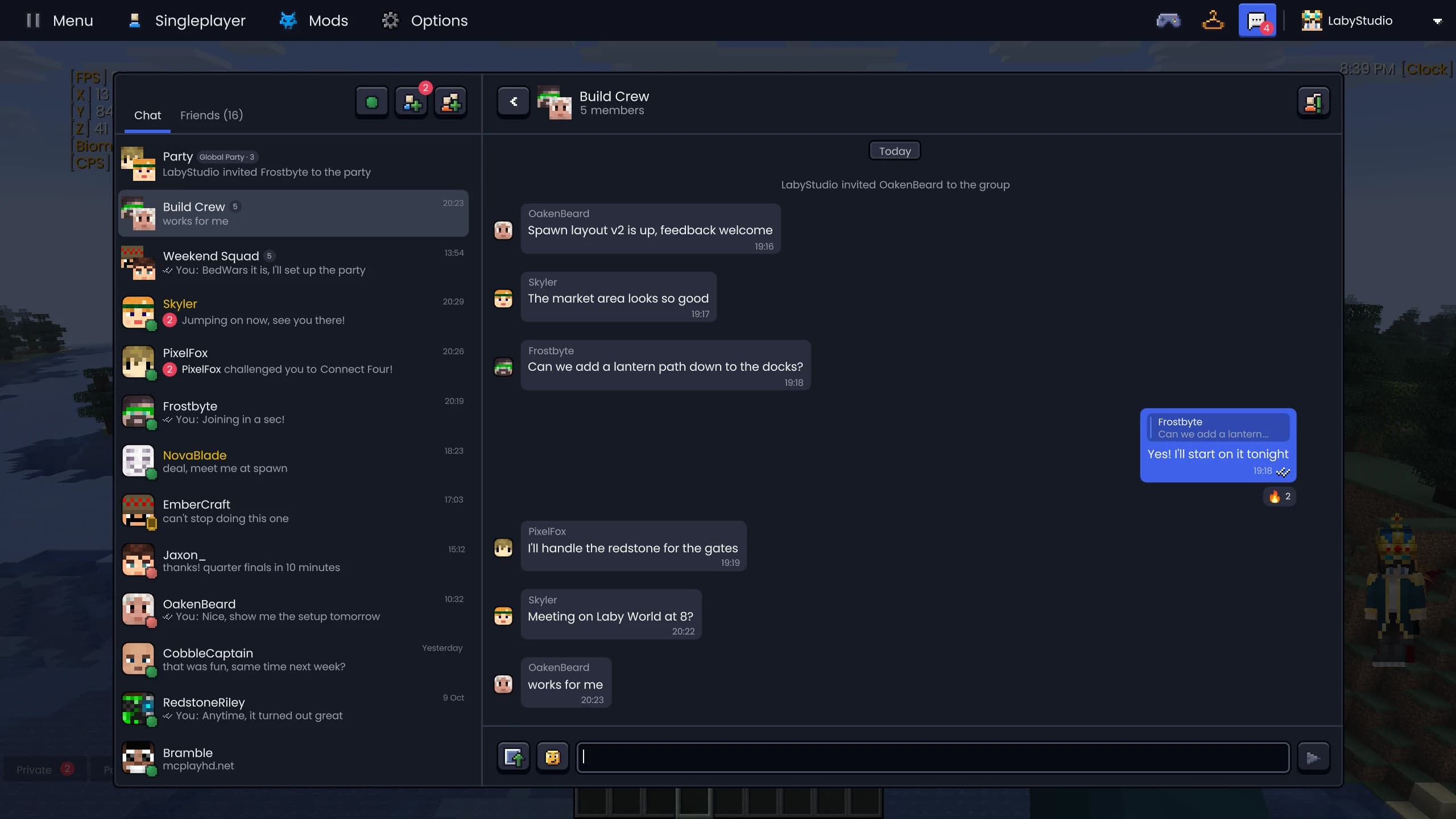
Laby Chat
Um só chat no jogo, no launcher, no app e no laby.net. Com parties que seguem você de servidor em servidor e minigames contra amigos.
Ferramentas de Chat
Pesquise no chat com Ctrl+F, organize tudo em abas e filtros, envie AutoText com uma tecla e veja os nomes antigos de qualquer jogador.
Laby Commander
Ctrl+K encontra qualquer mod, configuração, amigo e servidor de uma vez só. Ele também alterna configurações, toca emotes e faz contas.




Zoom, HUD, guarda-roupa e mais
Um editor de HUD com 58 widgets, zoom no C, animações da 1.7, World Sharing, emotes e sprays, o guarda-roupa, nametags e balões de fala, temas na sua cor, pequenas ferramentas, uma galeria de capturas de tela, Dynamic FPS e um FOV Changer.
Widgets do HUD
58 widgets para coordenadas, FPS, armadura, poções, CPS e mais. Arraste para onde quiser, encaixe uns nos outros e estilize cada rótulo.
Zoom
Segure C para dar zoom como uma luneta, role o mouse para aproximar mais e escolha como ele entra. Com câmera cinematográfica inclusa.
Classic PvP
Blockhitting, a antiga pose da espada e do arco, o agachar da 1.7 e armadura vermelha ao levar dano. O visual de combate da 1.8 nas versões modernas.
Compartilhar Mundo
Abra seu mundo do modo um jogador para os amigos com um clique. Sem abrir portas, sem servidor, com modos de privacidade, whitelist e marcadores.
Emotes e Sprays
Dance, acene e faça o floss com a roda de emotes, grafite sua arte nas paredes e, com o Laby+, use emotes diários novos todo dia.
Screenshots e Clipes
Uma galeria para todas as suas screenshots: álbuns por servidor e jogador, busca por metadados, compartilhamento com um clique, panoramas 360° e clipes automáticos de clutch.
Desempenho e Dynamic FPS
Mais FPS enquanto você joga e menos energia quando não está jogando: o Dynamic FPS segura o jogo em segundo plano e a renderização otimizada deixa tudo mais rápido.
Câmera e FOV
FOV Changer sem o zoom da corrida, sem balanço da visão, uma câmera de dano mais calma, mobs menores e Fullbright para cavernas.
AFK Camera
Saia de perto e a câmera filma seu personagem: dolly zooms, fly-bys e close-ups com barras de cinema. Qualquer tecla traz você de volta.
Guarda-roupa e Cosméticos
Experimente capas, asas, chapéus e mascotes, salve visuais e troque sua skin sem sair do jogo.
Nametags e Jogadores
Emblemas da Laby e bandeiras nas nametags, o chat em balões de fala, um menu para cada jogador e uma lista de jogadores com cabeças.
Temas e Interface
Menus limpos no tema Laby, Glass ou Vanilla, sua própria cor de destaque, desfoque de menu, Discord e configurações de janela.
Ferramentas
Um marcador para seus amigos, uma fita métrica, o limite de altura de construção e tochas que ficam na sua mão secundária.

Todos os mods e widgets em um só menu
Todos os mods e widgets de HUD em um só catálogo: escolha uma categoria à esquerda, pesquise ou filtre no topo e alterne entre três layouts de blocos. As prévias ao vivo mostram o que um mod faz antes de você ativá-lo, e os cards de widget vão direto para o seu HUD com um arrastar.
- Três layouts: lista, grade e blocos grandes
- Prévias ao vivo para mais 29 mods
- Fixe favoritos e organize arrastando
- Filtre por widgets, mods, ativados ou novos


Addons direto no menu de mods
Explore addons de terceiros dentro do menu de mods: em alta, em destaque e por categoria. Cada addon tem sua própria página com capturas de tela, avaliações, versões e reviews, e instala com um clique.
- Em alta, em destaque e categorias
- Capturas de tela, avaliações, downloads e versões
- Novidades, permissões e reviews
- "Mais como este" em cada página de addon
Mais fáceis de achar
Três mods ganharam nomes que dizem o que eles fazem.
- CPSantes Click Test
- Reach Displayantes Range
- Hit Colorantes Damage
Pequenas coisas que você vai usar todo dia
Editor de Cursor
Desenhe seu próprio cursor do mouse ou importe arquivos .cur e .ani animados.
Capturas Panorâmicas
Uma tecla de atalho tira uma captura de tela 360° em que você pode olhar ao redor.
Fundo Dinâmico
O fundo do menu é um mundo de blocos renderizado com sombras e luz colorida.
Custom GUI Scale
Ajuste a escala da interface em passos menores, como 2,5.
Perguntas e respostas
Quantos mods o Laby Client tem?
O Laby Client vem com mais de 300 mods e 58 widgets de HUD, da busca no inventário e ferramentas de PvP até visuais e ferramentas de chat. Na 1.8.9 faltam alguns, porque precisam de versões mais novas do jogo.
Preciso de Forge, Fabric ou OptiFine para esses mods?
Não. Todos os mods fazem parte do Laby Client e funcionam logo depois da instalação. Se quiser mais, a loja de addons no menu de mods tem addons de terceiros, e o Laby Launcher também abre Forge e Fabric.
Os mods do Laby Client são permitidos em servidores?
Sim. O Laby Client não tem cheats. Recursos que poderiam afetar a justiça do jogo ficam nas mãos do servidor: os marcadores de time só funcionam onde o servidor permite, e os servidores podem desativar coisas como o timer de TNT ou a busca no inventário.
Como eu ativo um mod?
Abra o menu de mods no Laby Client, encontre o mod pela categoria ou pela busca e clique no bloco dele. Com Ctrl+K (Cmd+K no Mac) você encontra e alterna qualquer mod ou configuração de qualquer lugar, até dentro do jogo.
Quais versões do Minecraft são suportadas?
O Laby Client roda em mais de 20 versões do Minecraft Java Edition, da 1.8.9 até a mais recente. Cada versão guarda seus próprios mods e configurações.
Os mods são grátis?
Sim. O Laby Client e todos os mods dele são grátis. A Laby ganha dinheiro com cosméticos opcionais e com o Laby+.
300+ mods, um download.
Instale o Laby Client, abra o menu de mods e ative o que você curtir.
Grátis, você só precisa da sua conta do Minecraft. Todos os mods já vêm incluídos.