Render API
Type a Minecraft name - every preview and snippet below switches to that player.
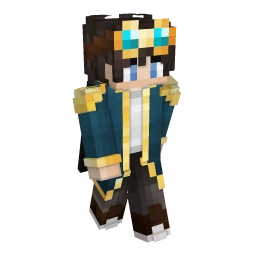
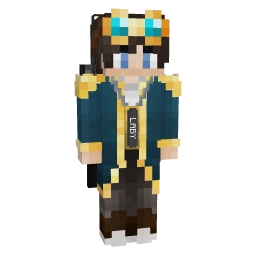
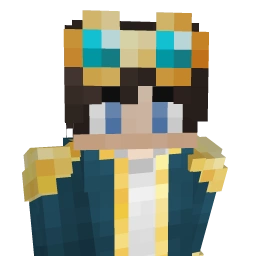
Quickstart#
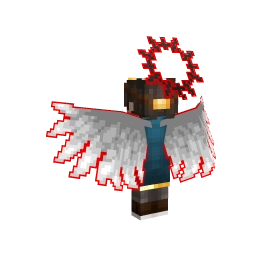
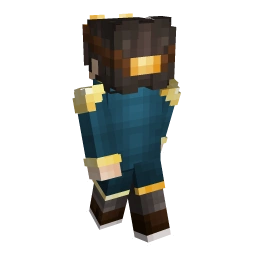
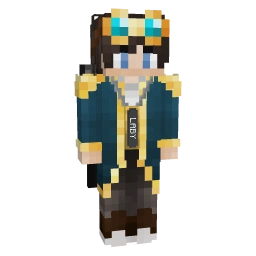
GET that answers with the image itself. No key, no sign-up, no SDK - put the URL into an <img> and you are done.<img src="https://laby.net/api/v3/render/player/34e57efa-5783-46c7-a9fc-890296aaba1f.webp" alt="LabyStudio" />
Basics#
Base URL
https://laby.net/api/v3/render
All routes are public GET requests. The file extension picks the format: /player/{uuid}.webp, .png or .gif.
Players are UUIDs
Player routes take the Minecraft UUID, with or without dashes. Names are not accepted (400 Invalid user) - they change hands, UUIDs do not. Resolve a name first, for example with Mojang's profile API.
laby.net needs to have seen the player once; a UUID without any skin on record answers 404.
Formats
| Extension | Output | 256 px |
|---|---|---|
| .webp | Transparent, compressed. Use this on the web. | ≈ 9 KB |
| .png | Lossless, transparent. Emotes: animated PNG. | ≈ 21 KB |
| .gif | 1-bit transparency. Emotes: animated GIF. | ≈ 9 KB |
Emote .webp is sized as a WhatsApp sticker (512 × 512) unless you pass size.
Size & quality
width and height go from 32 to 1024 px, default 256. Every render is supersampled for smooth edges (antiAliasing), as far as a budget of 2048 sub-pixels along the longer edge allows: 4× up to 512 px, 3× up to 682 px, 2× up to 1024 px.
That is the default - there is nothing to set. Pass antiAliasing=1 for hard pixel edges.
Caching
| Endpoint | Cached for |
|---|---|
| /player/{uuid} | 7 days |
| /bust/{uuid} | 7 days |
| /player/{uuid}/cosmetics | 1 hour |
| /player/{uuid}/cosmetic/{cosmetic} | 1 hour |
| /player/{uuid}/emote/{emote} | 1 hour |
| /skin/{hash} | 1 year |
| /cape/{hash} | 1 year |
| /cosmetic/{cosmetic} | 24 hours |
| /outfit/{code} | 24 hours |
| /emote/{emote} | 24 hours |
Player renders follow the latest skin but may lag behind a change by up to their cache time. Need it always current? Look up the active skin hash and render /skin/{hash} - hashes never change their image.
Rate limits
| Limit per IP | Endpoints |
|---|---|
| 200 / 2 s | Player, Bust, Player with cosmetics, Try on a cosmetic, Skin, Cosmetic, Outfit |
| 30 / 10 s | Player emote, Emote |
| 100 / minute | Cape |
Limits count per IP and route, and only for requests that reach the renderer - CDN hits are free. Every response carries X-RateLimit-Limit, X-RateLimit-Remaining and X-RateLimit-Reset (Unix ms); past the limit you get 429.
Errors
Failures answer with JSON instead of an image: {"error": "Texture not found"}.
| Status | Meaning |
|---|---|
| 400 | Malformed input: a name instead of a UUID, a bad hex color, an unsupported extension. |
| 404 | Unknown player skin, texture hash, cosmetic, emote or outfit. |
| 429 | Rate limit exceeded - wait for X-RateLimit-Reset. |
| 500 | The render failed; emotes that exceed their time budget end here. |
In the browser
<img>, CSS backgrounds, Discord embeds and Markdown work from anywhere. Reading the pixels from another site - fetch(), a <canvas> - is blocked by CORS, which only admits laby.net itself.
Need the bytes in your app? Download the render on your server, cache it there, and serve it from your own origin.
Finding IDs#
The entry with active: true is the one they wear. image_hash is what /skin and /cape take.
options is the order of the comma-separated data values; default_data is what an omitted value falls back to.
Entries with draft: true are not released yet.
Or take the code from any shared outfit link.
Players#
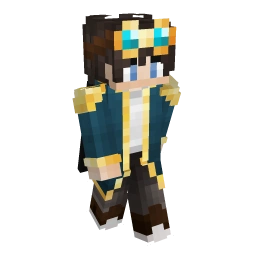
Full body of a player with their current skin and Minecraft cape.
Renders the player's latest skin in the classic idle pose. The Minecraft cape they wear is added automatically; pass cape to swap it for any other cape hash.
Slim (Alex) skins are detected from the texture, so the arms always match.
A skin change can take up to a week to show. For always-current images, render the skin hash instead.
{uuid}Minecraft UUID, with or without dashes.
{format}webp is transparent and a fraction of the size - the best pick for the web.
Tick a parameter to send it, or just move its control. Unticked ones use the server default.
Image width in pixels. Clamped to 32 - 1024.
Default: 256
Image height in pixels. Clamped to 32 - 1024.
Default: 256
Which side faces the camera. both puts a front and a back view side by side.
Default: front
Soft drop shadow under the model.
Default: false
Background fill as hex, RRGGBB or AARRGGBB (alpha first, no #). Transparent when left out.
Default: transparent
Second background color: together with backgroundColor1 it paints a 20 px checkerboard.
Default: transparent
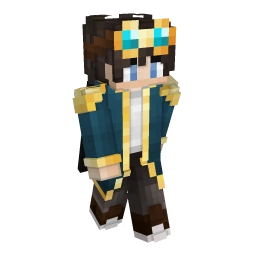
Head and shoulders, turned slightly - made for avatars.
A close-up of the player's upper body with the head turned towards the viewer. This is what laby.net uses for profile avatars, Discord embeds and Snapchat stickers.
{uuid}Minecraft UUID, with or without dashes.
{format}webp is transparent and a fraction of the size - the best pick for the web.
Tick a parameter to send it, or just move its control. Unticked ones use the server default.
Image width in pixels. Clamped to 32 - 1024.
Default: 256
Image height in pixels. Clamped to 32 - 1024.
Default: 256
Soft drop shadow under the model.
Default: false
Background fill as hex, RRGGBB or AARRGGBB (alpha first, no #). Transparent when left out.
Default: transparent
Second background color: together with backgroundColor1 it paints a 20 px checkerboard.
Default: transparent
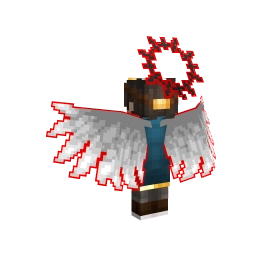
The player exactly as others see them in LabyMod: skin, every enabled cosmetic and the cape.
Renders every cosmetic the player has switched on, in their chosen colors and textures. The Minecraft cape is shown unless a Laby cloak is worn - the cloak wins, like in game.
Uses the cosmetic renderer, so all pose and camera parameters apply. The camera fits itself to the geometry, which keeps tall wings and pets in frame.
Players without a skin on record are rendered with the default skin instead of failing.
{uuid}Minecraft UUID, with or without dashes.
{format}webp is transparent and a fraction of the size - the best pick for the web.
Tick a parameter to send it, or just move its control. Unticked ones use the server default.
Image width in pixels. Clamped to 32 - 1024.
Default: 256
Image height in pixels. Clamped to 32 - 1024.
Default: 256
back turns the camera behind the player, which is where wings and capes live.
Default: front
Where in their idle loop animated cosmetics (wings, auras, pets) are caught, in percent. 50 is mid-loop and usually the most interesting pose. Left out, the resting pose is used.
Default: resting pose
gallery switches to one fixed camera for every render, so a grid of outfits keeps the player the same size in every tile.
Default: none
Multiplier on both lights, 0.1 - 2. Emissive cosmetics stay full-bright, so dimming makes glowing parts pop.
Default: 1.0
<img
  src="https://laby.net/api/v3/render/player/34e57efa-5783-46c7-a9fc-890296aaba1f/cosmetics.webp?width=256&height=256&frame=50"
  alt="LabyStudio · Player with cosmetics"
  loading="lazy"
/>
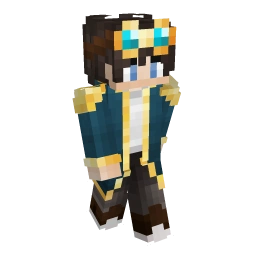
One cosmetic on a player's skin - whether they own it or not.
By default the player wears only this one cosmetic. With cosmetics=true it goes on top of everything they already wear, which is what trying it on looks like; if they wear the same cosmetic already, it is drawn once with the requested data.
{uuid}Minecraft UUID, with or without dashes.
{cosmetic}Cosmetic id from the cosmetic index.
{format}webp is transparent and a fraction of the size - the best pick for the web.
Tick a parameter to send it, or just move its control. Unticked ones use the server default.
Add the cosmetic on top of the player's enabled cosmetics and cape.
Default: false
The cosmetic's options as comma-separated values, in the order of its options list in the cosmetic index (textures, RRGGBB colors, x;y;z offsets, …). Positions left out fall back to the cosmetic's defaults.
Default: cosmetic defaults
Image width in pixels. Clamped to 32 - 1024.
Default: 256
Image height in pixels. Clamped to 32 - 1024.
Default: 256
back turns the camera behind the player, which is where wings and capes live.
Default: front
Where in their idle loop animated cosmetics (wings, auras, pets) are caught, in percent. 50 is mid-loop and usually the most interesting pose. Left out, the resting pose is used.
Default: resting pose
gallery switches to one fixed camera for every render, so a grid of outfits keeps the player the same size in every tile.
Default: none
Multiplier on both lights, 0.1 - 2. Emissive cosmetics stay full-bright, so dimming makes glowing parts pop.
Default: 1.0
<img
  src="https://laby.net/api/v3/render/player/34e57efa-5783-46c7-a9fc-890296aaba1f/cosmetic/1768.webp?width=256&height=256&pose=back&frame=50"
  alt="LabyStudio · Try on a cosmetic"
  loading="lazy"
/>
The player performing an emote, wearing their cosmetics, as a looping animation.
An infinitely looping animation of the player doing the emote, cosmetics included. .png is an animated PNG, .gif exists for places that only animate GIFs (iOS notifications), .webp is sized as a WhatsApp sticker (512 × 512).
Rendering an animation is expensive; the stricter rate limit reflects that. For grids and pickers ask for frame=50 - one frame instead of a hundred.
24 h when the skin is pinned with skin.
{uuid}Minecraft UUID, with or without dashes.
{emote}Emote id from the emote index.
{format}png is an animated PNG, gif for places that only animate GIFs, webp for stickers.
Tick a parameter to send it, or just move its control. Unticked ones use the server default.
Returns one still frame at this position of the loop (percent) instead of the animation - a normal PNG of a few KB instead of a ~250 KB APNG. frame=50 is the thumbnail pose; frame 0 is the same neutral pose for every emote.
Default: animated
Square output size in pixels, clamped to 64 - 512.
Default: 256 (512 for .webp)
Frame rate of the animation, 6 - 48.
Default: 12
Wear the player's enabled cosmetics. false renders the bare skin.
Default: true
Pins the skin by hash instead of using the player's current one. Pinned renders are immutable, so the CDN keeps them 24 h instead of 1 h - chat messages use this so old stickers never change.
Default: current skin
Textures#
Any skin texture by its laby.net hash.
Renders a skin texture on its own. Hashes are content-addressed, so the image behind a URL never changes - that is why this is cached for a year, and why it is the right choice when you want a render that is always up to date: look up the current hash, then render it.
Default-parameter renders are additionally kept in object storage, so the most common URL is the fastest one.
Get a player's skin hashes from GET https://laby.net/api/v3/user/{uuid}/textures - the entry with active: true is the one they wear.
{hash}laby.net skin hash (32 hex digits).
{format}webp is transparent and a fraction of the size - the best pick for the web.
Tick a parameter to send it, or just move its control. Unticked ones use the server default.
Image width in pixels. Clamped to 32 - 1024.
Default: 256
Image height in pixels. Clamped to 32 - 1024.
Default: 256
Which side faces the camera. both puts a front and a back view side by side.
Default: front
Soft drop shadow under the model.
Default: false
Background fill as hex, RRGGBB or AARRGGBB (alpha first, no #). Transparent when left out.
Default: transparent
Second background color: together with backgroundColor1 it paints a 20 px checkerboard.
Default: transparent
Hang a cape on the skin.
Default: no cape
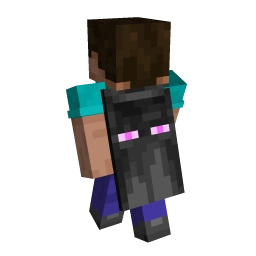
A Minecraft cape on the default skin, seen from behind.
Renders a cape texture on the default Steve body, turned around by default so the cape faces the camera.
{hash}laby.net cape hash (32 hex digits).
{format}webp is transparent and a fraction of the size - the best pick for the web.
Tick a parameter to send it, or just move its control. Unticked ones use the server default.
Image width in pixels. Clamped to 32 - 1024.
Default: 256
Image height in pixels. Clamped to 32 - 1024.
Default: 256
Which side faces the camera.
Default: back
Soft drop shadow under the model.
Default: false
Background fill as hex, RRGGBB or AARRGGBB (alpha first, no #). Transparent when left out.
Default: transparent
Second background color: together with backgroundColor1 it paints a 20 px checkerboard.
Default: transparent
Cosmetics & Outfits#
A single cosmetic on a skin of your choice - made for shop previews.
Renders one cosmetic in the given options. Without skin it is worn by the default skin. Unlike the player route, an unknown cosmetic id does not fail - it renders the bare player.
{cosmetic}Cosmetic id from the cosmetic index.
{format}webp is transparent and a fraction of the size - the best pick for the web.
Tick a parameter to send it, or just move its control. Unticked ones use the server default.
The cosmetic's options as comma-separated values, in the order of its options list in the cosmetic index (textures, RRGGBB colors, x;y;z offsets, …). Positions left out fall back to the cosmetic's defaults.
Default: cosmetic defaults
A laby.net skin hash to render with. Defaults to the LabyMod default skin.
Default: see description
Image width in pixels. Clamped to 32 - 1024.
Default: 256
Image height in pixels. Clamped to 32 - 1024.
Default: 256
back turns the camera behind the player, which is where wings and capes live.
Default: front
Where in their idle loop animated cosmetics (wings, auras, pets) are caught, in percent. 50 is mid-loop and usually the most interesting pose. Left out, the resting pose is used.
Default: resting pose
gallery switches to one fixed camera for every render, so a grid of outfits keeps the player the same size in every tile.
Default: none
Multiplier on both lights, 0.1 - 2. Emissive cosmetics stay full-bright, so dimming makes glowing parts pop.
Default: 1.0
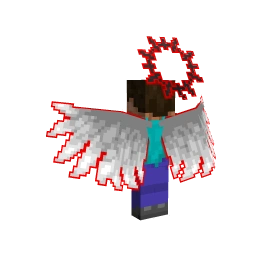
A saved outfit by its share code.
Renders a saved outfit with all of its cosmetics. The skin it was saved with is used when there is one (about a quarter of all outfits), otherwise the default skin; skin overrides both.
Outfits are addressed by share code only - numeric ids are not accepted.
Use preset=gallery for grids: every tile shares one camera, so players line up.
{code}Outfit share code, e.g. from an outfit link.
{format}webp is transparent and a fraction of the size - the best pick for the web.
Tick a parameter to send it, or just move its control. Unticked ones use the server default.
A laby.net skin hash to render with. Defaults to the outfit's own skin, then the default skin.
Default: see description
Image width in pixels. Clamped to 32 - 1024.
Default: 256
Image height in pixels. Clamped to 32 - 1024.
Default: 256
back turns the camera behind the player, which is where wings and capes live.
Default: front
Where in their idle loop animated cosmetics (wings, auras, pets) are caught, in percent. 50 is mid-loop and usually the most interesting pose. Left out, the resting pose is used.
Default: resting pose
gallery switches to one fixed camera for every render, so a grid of outfits keeps the player the same size in every tile.
Default: none
Multiplier on both lights, 0.1 - 2. Emissive cosmetics stay full-bright, so dimming makes glowing parts pop.
Default: 1.0
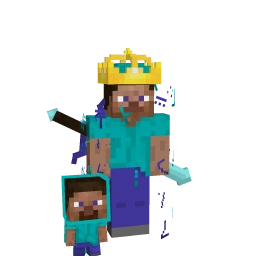
Emotes#
An emote without a player context.
The LabyMod skin performs the emote, without cosmetics. Immutable per emote, skin and frame, so the CDN keeps it for a day.
{emote}Emote id from the emote index.
{format}png is an animated PNG, gif for places that only animate GIFs, webp for stickers.
Tick a parameter to send it, or just move its control. Unticked ones use the server default.
Returns one still frame at this position of the loop (percent) instead of the animation - a normal PNG of a few KB instead of a ~250 KB APNG. frame=50 is the thumbnail pose; frame 0 is the same neutral pose for every emote.
Default: animated
Square output size in pixels, clamped to 64 - 512.
Default: 256 (512 for .webp)
Frame rate of the animation, 6 - 48.
Default: 12
Skin hash that performs the emote. Defaults to the LabyMod skin.
Default: LabyMod skin
Legacy URLs#
skin.laby.net/api/render/… links keep working: they answer 301 with the matching v3 URL, parameters translated. New integrations should call v3 directly - it saves the redirect and the old default size of 135 × 257.| skin.laby.net | laby.net |
|---|---|
| /api/render/user/{uuid} | /api/v3/render/player/{uuid} |
| /api/render/user/{uuid}?bust=true | /api/v3/render/bust/{uuid} |
| /api/render/skin/{hash} · /texture/{hash} | /api/v3/render/skin/{hash} |
| /api/render/cape/{hash} · /cloak/{hash} | /api/v3/render/cape/{hash} |
| both_sides=true | pose=both |
| shadow=true | shadowBlur=true |
| bg_color1 / bg_color2 (decimal ARGB) | backgroundColor1 / backgroundColor2 (hex) |
| no width / height | width=135&height=257 |