Minecraft-mods in de Laby ClientElke mod die je nodig hebt, zit er al in.
De Laby Client heeft 300+ mods en 58 HUD-widgets aan boord. Zet ze aan in één menu, vind elke instelling met Ctrl+K en haal er meer bij uit de addonstore zonder de game te verlaten.
- Gratis
- Minecraft 1.8.9 tot de nieuwste versie
- Windows, macOS en Linux
Minecraft-mods voor elk deel van de game
Doorzoek elke kist, zie elke treffer, maak je zicht vrij, sorteer de chat, praat met je vrienden en vind elke instelling met Ctrl+K. Ingebouwd in de Laby Client en gratis, van 1.8.9 tot de nieuwste versie.

Inventaris-mod
Doorzoek elke kist, kijk in shulkerdozen, zet vakjes op slot en krijg een waarschuwing voordat je uitrusting kapotgaat. 23 upgrades in één mod.
PvP & gevechten
Hit Markers, kill-geluiden, een waarschuwing bij weinig levens, TNT-timers, teammarkers, schildkleuren en een HUD die de score bijhoudt.
Graphics
Verschuif en schaal de items in je hand, geef de betoveringsglans een andere kleur, verlaag het vuur, stel elk deeltje af en trek condensstrepen met je dekschild.
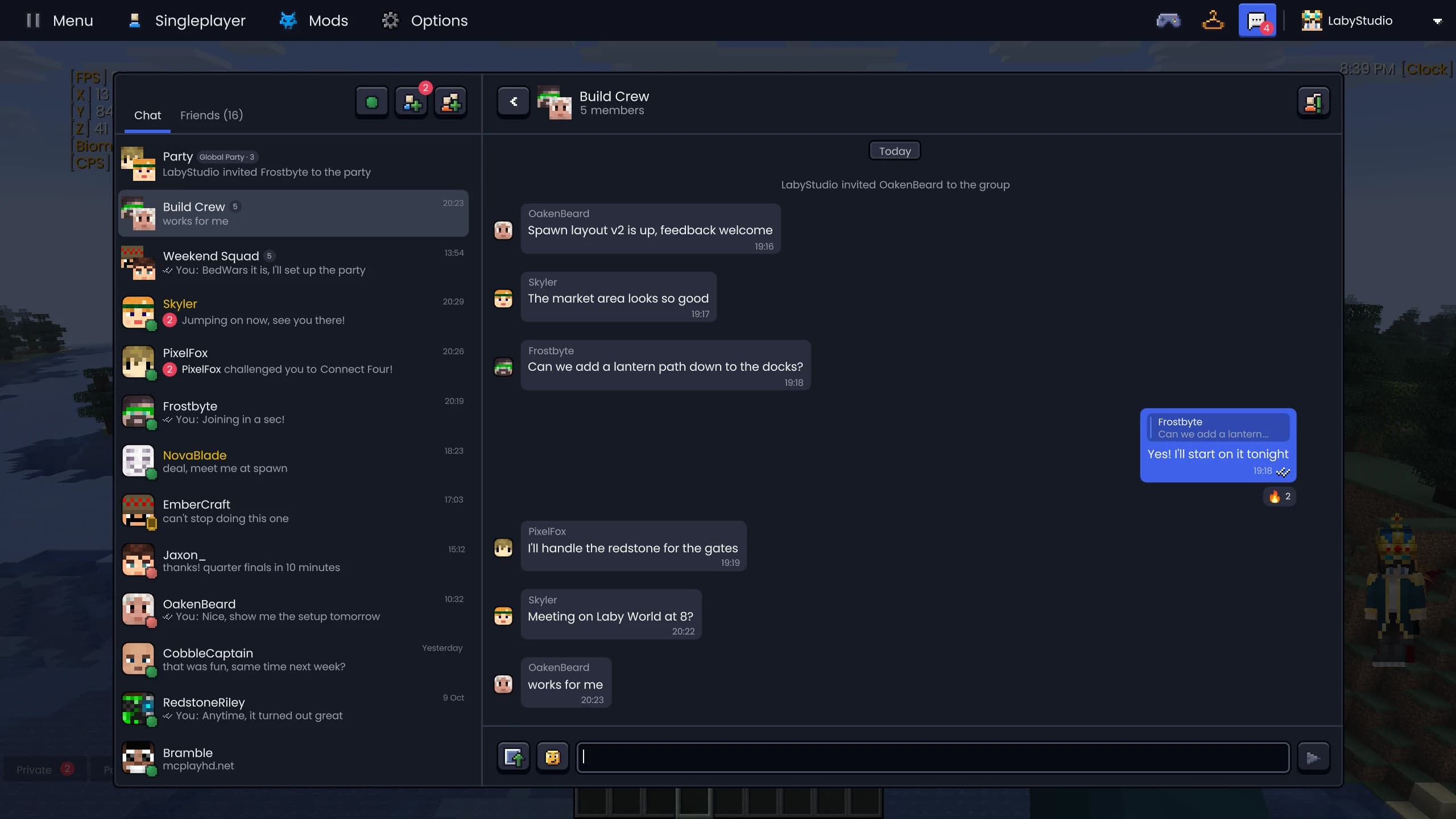
Laby Chat
Eén chat in de game, de launcher, de app en op laby.net. Met party's die je over servers heen volgen en minigames tegen vrienden.
Chattools
Doorzoek de chat met Ctrl+F, verdeel hem over tabs en filters, stuur AutoText met één toets en zoek de oude namen van elke speler op.
Laby Commander
Ctrl+K vindt elke mod, instelling, vriend en server tegelijk. Hij zet ook instellingen aan of uit, speelt emotes af en rekent voor je.




Zoom, HUD, garderobe en meer
Een HUD-editor met 58 widgets, zoom op C, animaties uit 1.7, World Sharing, emotes en sprays, de garderobe, naamkaartjes en tekstballonnen, thema's in jouw kleur, kleine hulpmiddelen, een screenshotgalerij, Dynamic FPS en een FOV Changer.
HUD-widgets
58 widgets voor coördinaten, FPS, harnas, dranken, CPS en meer. Sleep ze waar je wilt, laat ze aan elkaar vastklikken en geef elk label een eigen stijl.
Zoom
Houd C ingedrukt om te zoomen als met een verrekijker, scroll om verder in te zoomen en kies hoe de zoom inglijdt. Inclusief filmische camera.
Classic PvP
Blockhitting, de oude zwaard- en booghouding, het sluipen van 1.7 en rood harnas bij treffers. De 1.8-gevechtslook op moderne versies.
Wereld delen
Open je singleplayerwereld met één klik voor vrienden. Geen port forwarding, geen server, met privacymodi, een whitelist en markers.
Emotes & sprays
Dans, zwaai en floss met het emotewiel, spray je kunst op muren en speel met Laby+ elke dag nieuwe dagelijkse emotes.
Screenshots & clips
Een galerij voor elke screenshot: albums per server en speler, zoeken op metadata, delen met één klik, 360°-panorama's en automatische clutch-clips.
Prestaties & Dynamic FPS
Meer FPS tijdens het spelen en minder stroom als je niet speelt: Dynamic FPS remt de game af op de achtergrond, geoptimaliseerde rendering maakt hem sneller.
Camera & FOV
FOV Changer zonder sprintzoom, geen view bobbing, een rustigere camera bij schade, kleinere mobs en een Fullbright-schakelaar voor grotten.
AFK Camera
Loop even weg en de camera filmt je speler: dolly zooms, fly-bys en close-ups met zwarte balken. Eén toets en je bent terug.
Garderobe & cosmetics
Probeer capes, vleugels, hoeden en huisdieren uit, bewaar outfits en wissel van skin zonder de game te verlaten.
Naamkaartjes & spelers
Laby-badges en vlaggen op naamkaartjes, de chat in tekstballonnen, een menu voor elke speler en een spelerslijst met hoofden.
Thema's & interface
Strakke menu's in het Laby-, Glass- of Vanilla-thema, je eigen accentkleur, menu blur, Discord- en vensterinstellingen.
Hulpmiddelen
Een marker voor je vrienden, een meetlint, de maximale bouwhoogte en fakkels die in je secundaire hand blijven.

Elke mod en elke widget in één menu
Elke mod en elke HUD-widget in één catalogus: kies links een categorie, zoek of filter bovenaan en wissel tussen drie tegelweergaven. Live voorbeelden laten zien wat een mod doet voordat je hem aanzet, en widgetkaarten sleep je meteen op je HUD.
- Drie weergaven: Lijst, Raster en Grote tegels
- Live voorbeelden voor nog 29 mods
- Favorieten vastzetten en sorteren door te slepen
- Filteren op widgets, mods, ingeschakeld of nieuw


Addons, gewoon in het Mods-menu
Blader in het Mods-menu door addons van externe makers: trending, uitgelicht en per categorie. Elke addon heeft een eigen pagina met screenshots, beoordelingen, versies en reviews, en installeer je met één klik.
- Trending, uitgelicht en categorieën
- Screenshots, beoordelingen, downloads en versies
- Wat is er nieuw, rechten en reviews
- "Meer zoals dit" op elke addonpagina
Makkelijker te vinden
Drie mods hebben een naam gekregen die zegt wat ze doen.
- CPSvoorheen Click Test
- Reach Displayvoorheen Range
- Hit Colorvoorheen Damage
Kleine dingen die je elke dag gebruikt
Cursoreditor
Teken je eigen muiscursor of importeer .cur-bestanden en geanimeerde .ani-bestanden.
Panoramascreenshots
Eén sneltoets maakt een 360°-screenshot waarin je kunt rondkijken.
Dynamische achtergrond
De menuachtergrond is een gerenderde blokkenwereld met schaduwen en gekleurd licht.
Custom GUI Scale
Schaal de interface in fijnere stappen, zoals 2,5.
Vragen en antwoorden
Hoeveel mods heeft de Laby Client?
De Laby Client heeft meer dan 300 mods en 58 HUD-widgets, van inventaris zoeken en PvP-tools tot graphics en chattools. Op 1.8.9 ontbreken er een paar, omdat ze nieuwere gameversies nodig hebben.
Heb ik Forge, Fabric of OptiFine nodig voor deze mods?
Nee. Alle mods horen bij de Laby Client en werken direct na de installatie. Wil je meer? In de addonstore in het Mods-menu vind je addons van externe makers, en de Laby Launcher kan ook Forge en Fabric starten.
Zijn de mods van de Laby Client toegestaan op servers?
Ja. De Laby Client heeft geen cheats. Functies die voor eerlijkheid uit kunnen maken, liggen in handen van de server: teammarkers werken alleen waar de server ze toestaat, en servers kunnen dingen als de TNT-timer of het zoeken in je inventaris uitzetten.
Hoe zet ik een mod aan?
Open het Mods-menu in de Laby Client, zoek de mod via de categorie of de zoekfunctie en klik op de tegel. Met Ctrl+K (Cmd+K op een Mac) vind en schakel je elke mod of instelling overal, zelfs in de game.
Welke Minecraft-versies worden ondersteund?
De Laby Client draait op meer dan 20 versies van Minecraft Java Edition, van 1.8.9 tot de nieuwste versie. Elke versie houdt zijn eigen mods en instellingen.
Zijn de mods gratis?
Ja. De Laby Client en elke mod erin zijn gratis. Laby verdient geld met optionele cosmetics en Laby+.
300+ mods, één download.
Installeer de Laby Client, open het Mods-menu en zet aan wat je leuk vindt.
Gratis, je hebt alleen je Minecraft-account nodig. Alle mods zitten er al in.