Minecraft Visual ModsLower the fire, clear the view.

The Laby Client lowers the fire, clears the glass and recolors the glint. Move the sword in your hand, recolor every particle and leave vapor trails with your elytra. Only you see it.

Download for Windows
  • Free
  • Minecraft 1.8.9 to the latest release
  • Windows, macOS and Linux
MinecraftLaby Client
  • Lower, fainter fire
  • Clear glass
  • Glint color

Drag the divider, or focus it and use the arrow keys

Item Appearance

Hold your items where you want them

Move, rotate and resize the items in your hands, change how fast they swing and make dropped items bigger or smaller. Set it for all items, per item group or for one item. New profile from held item starts a profile for whatever you are holding.

  • Left/right, up/down and forward/back, per hand (1.9+)
  • Three rotations of ±180° and a size from 0.1 to 2
  • Swing speed from 0.25 to 3×, the swing follows the item's size
  • Profiles for all items, the empty hand, 13 item groups or one item
  • Dropped items from 0.25 to 2×, single items up to 4×
  • UHC preset: gold, golden apples, heads and pearls at 2×

Only you see the changes. Servers can turn off held item changes and dropped item sizes. For the exact 1.7 positions of sword, bow and rod, use Classic PvP.

The All items profile in the Mods menu, with the held sword behind it
Enchantment Glint

Give your enchantments a color

Recolor the shimmer on enchanted items and armor, or let it cycle through every color with chroma. When the glint gets in the way, keep it only on the item icons in menus and the HUD, or turn it off.

  • Visible everywhere, only on item icons, or nowhere
  • Item color and a separate armor color, both with chroma
  • Blend: Glow or Tint
  • Pattern angle ±180°, pattern size 25 to 400 %
  • Brightness and speed 10 to 500 % on 1.8.9 to 1.18.2
Minecraft's purple glint, then teal, pink, gold and blue
Clear View

Lower the fire, clear the glass

Takes clutter out of your view: lower fire, fainter screen overlays, clear glass and tripwires that are easy to spot. Every option starts at the vanilla look, so you only change what bothers you.

  • Fire Height and Fire Opacity from 0 to 100
  • Hides the fire while you have Fire Resistance, it returns 5 s before the effect ends
  • Pumpkin overlay 0 to 100, powder snow overlay 0 to 100 (1.17+)
  • Hide the vignette
  • Clear Glass removes the streaks, stained glass too
  • Colored (red) and bold tripwires

Want your shield lower too? That is Shield Height in the PvP mods. Camera bobbing while you walk and the tilt when you get hit go away with No View Bobbing and Damage Tilt.

Fire Height down to 35, then Fire Opacity down to 55
Particles

Every particle, your way

Multiply, resize, recolor or hide every particle type, from sword crits to raindrops. Hit particles can show on every hit, or only on the hits the server really counted.

  • 139 particle types in 9 groups, from Combat to Weather & Nature
  • Per type: on or off, multiplier 0.25 to 10×, size 0.25 to 2×
  • Color with chroma and alpha, or replace the color
  • Always Critical Hits, Always Sharpness, Only Registered Hits
  • Hide your own particles in first person
  • Block breaking and hitting, particle physics, hide all

Fewer particles also help a slow PC, and Dynamic FPS and optimized rendering keep the frame rate up.

Normal hits, Always Critical Hits and Sharpness, 4× crits, then crits in pink
Wingtip Vortices

Leave vapor trails with your elytra

Vapor trails stream from the wing tips of players gliding with an elytra. They grow with your speed and flare up when you pull up or turn, so every dive leaves a line in the sky.

  • On by default, Minecraft 1.9 and newer
  • Trail length from 1 to 8 s (3 s by default)
  • Trail color with alpha and chroma, darker at night
  • Also for other players within 128 blocks
An elytra air show: four players fly loops and formations, every trail in its own color
Custom GUI Scale

A GUI scale between the steps

Scales the whole game in finer steps than Minecraft's GUI Scale. Where Minecraft jumps from 2 to 3, the Laby Client also has 2.125, 2.25, 2.5 and every step between, so menus and the HUD fit your screen.

  • From 1.0 to 6.0 in steps of 0.125 (2.0 by default)
  • Ctrl + and Ctrl − change it while you play
  • Key step from 0.125 to 1 (0.25 by default)
  • Vanilla only has whole steps: 1, 2, 3, 4 and so on
The inventory at interface scale 3.0, up to 4.5 in steps of 0.25 and back
Interface

The menus get an upgrade too

A cursor you draw yourself, a main menu rendered live and screenshots that go all the way around.

Custom Cursor

Draw your own cursor

Draw your own mouse cursor and wear it in every menu. Start from one of 17 templates, from arrows and swords to hands and resize arrows, or import a .cur file, an animated .ani file or an image.

  • Pen, Erase, Fill, Pick, Tip, Undo and Clear on a 32 × 32 canvas
  • Own cursors for clicking, text, scrollbars and sliders
  • Size 1 to 4, drop shadow, rainbow, glow and trail
Dynamic Background

A main menu rendered live

Instead of the panorama, the main menu shows a cave rendered live behind the buttons: warm lava and torch light in a dark vault, reached by a short flight in from the splash screen. In winter the cave is snowed in.

  • Low, Medium, High or Ultra: higher presets add shadows, bloom, light shafts, fog and depth of field
  • Blur and resolution of your choice
  • Snowflakes in December, January and February
  • Limits itself to 15 FPS while the window is in the background

Drag to look around

Panorama Screenshots

Screenshots all the way around

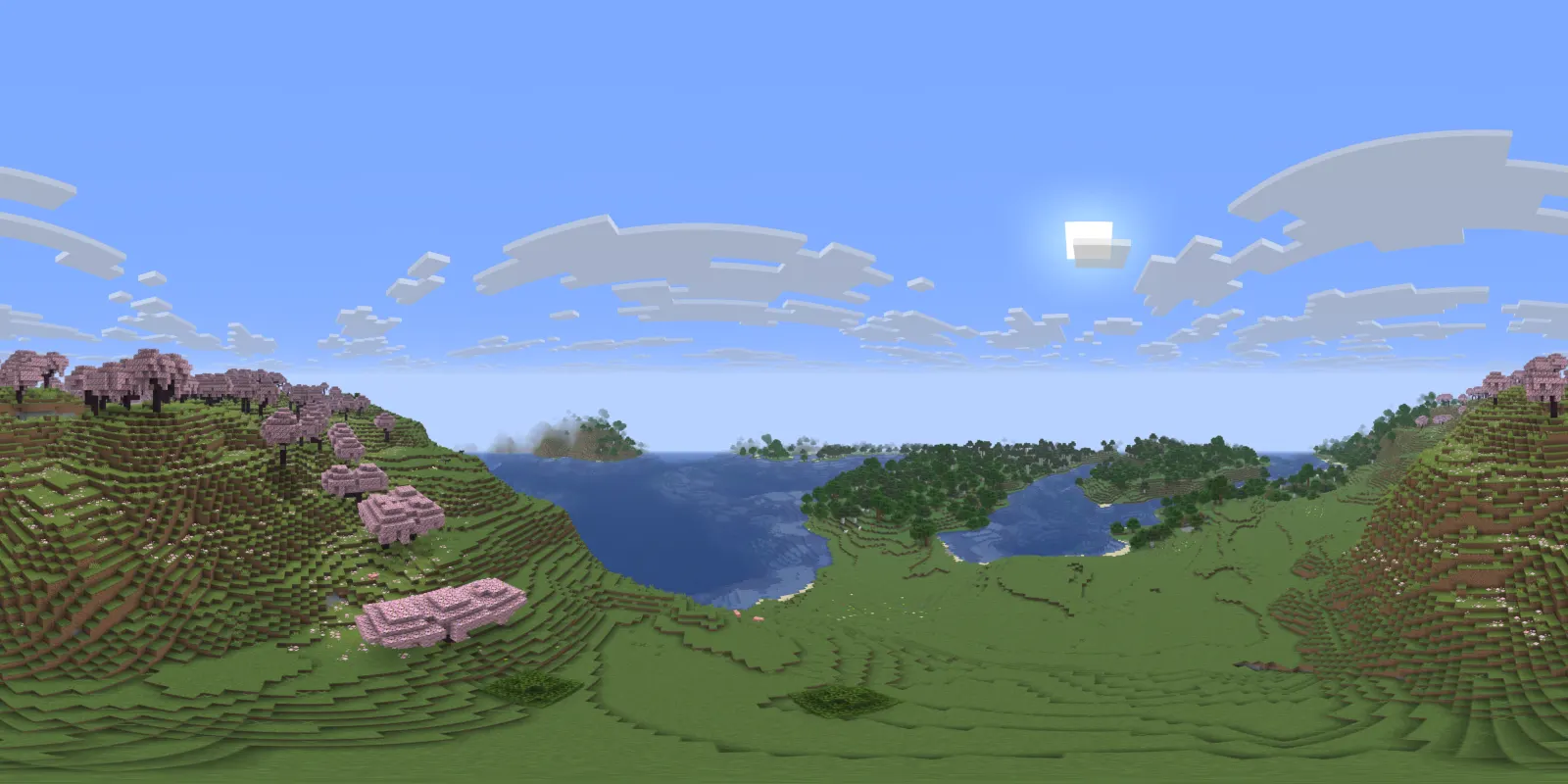
A hotkey takes a 360° screenshot of where you stand. It is saved as a 4096 × 2048 equirectangular image in a panoramas folder, and in the screenshot viewer you can look around in it.

  • 360°, saved as 4096 × 2048
  • Its own panoramas folder
  • Look around in the screenshot viewer

Questions and answers

How do I lower the fire in Minecraft?

Install the Laby Client and open Clear View in its settings. Fire Height lowers the fire overlay and Fire Opacity makes it see-through, both from 0 to 100. Clear View can also hide the fire while you have Fire Resistance; it comes back 5 seconds before the effect ends.

How do I change the enchantment glint color?

Open Enchantment Glint in the Laby Client and pick an item color. Armor has a color of its own, both can cycle through every color with chroma, and Glow or Tint decides how the color mixes with the item.

What is a custom GUI scale?

Minecraft's GUI Scale only has whole steps: 1, 2, 3, 4 and so on. Custom GUI Scale in the Laby Client goes from 1.0 to 6.0 in steps of 0.125, so you can pick 2.5 when 2 is too small and 3 too big. Ctrl + and Ctrl − change it in game.

How do I make my sword smaller or move it in Minecraft?

With Item Appearance in the Laby Client. Move, rotate and resize the items in each hand, change the swing speed and resize dropped items, for all items, per item group or for a single item.

How do I get clear glass in Minecraft without a resource pack?

Turn on Clear Glass in Clear View. It removes the streaks from glass and stained glass, no resource pack needed.

Do other players see my visual changes?

No. The visual mods only change what you see on your own screen. Servers can turn off held item changes and dropped item sizes of Item Appearance.

Your game, your view.

Download the Laby Client and every visual mod is already inside. Free, for Minecraft 1.8.9 to the latest release.

Free, no account beyond your Minecraft one. Every mod is already inside.